Showing posts with label ibm. Show all posts

Sunday, May 13, 2012

Monetizing your mobile apps using IBM Worklight and Ad networks - Part 1

While mobile has become a platform that can no longer be ignored by businesses and developers alike and efforts are on way almost in all industry sectors to leverage this platform, it is silently becoming one of the best marketing and advertising platform of our times. Why? With 300,000+ apps and 10 billion downloads in the last 3 years alone, people are spending ever-increasing amounts of time on their smartphones. The mobile revolution has been much faster than the PC revolution in its reach and adoption. "Mobile media consumption is growing fast, as people worldwide are now spending more time on their mobile devices than watching TV. In the U.S., people are spending about 142 minutes a day on their devices, compared to 135 minutes for TV and 96 minutes on PCs, making mobile the primary media consumption channel in the nation.", says InMobi's Anne Frisbie. An infographic I stumbled upon recently has some even more convincing numbers. Click on the image below to see the complete infographic.


That being said, how does an application developer or an enterprise show targeted ads to consumers or clients? The more popular approach is to incorporate ad banners that can be used to show ads from a mobile ad network such as Google AdMob or InMobi. What are mobile ad networks? They're agencies that purchase ads from companies who want to promote their products on mobile apps. An app developer, also known as a publisher, gets paid on different pricing models if he agrees to show those ads on his app, using the SDKs or services provided by the ad networks. You can read more about the different kinds of ad networks here. 


While its relatively easy to use these SDKs in native applications, its still not straightforward to do so in a hybrid or mobile web application, which are becoming more popular with the cross-platform advantage they offer. So if I'm developing, say, a hybrid app, how do I use say, the Google AdMob SDK, which is primarily for an Android app? IBM Worklight, part of the IBM Mobile Foundation is a powerful development platform which allows you to do this easily. Here are some steps that outline how native ad SDKs can be used along with a hybrid app:


1. Create a Worklight project, adding all the common web code to the 'common' folder and overriding Android specific behavior in the 'android' folder by creating a new Android environment. If you're new to Worklight, you can read the Worklight tutorials to learn how to work with a Worklight project.


3. Add the SDK JAR to the android>native>libs folder.

4. Declare com.google.ads.AdActivity in AndroidManifest.xml located in the android>native folder.

5. Setup the required network permissions(INTERNET and ACCESS_NETWORK) in the AndroidManifest.

6. Now navigate to android>native>res>layout>main.xml and open it in the xml view. You will see a single WebView declared in the xml. All you need to do is add an AdView to the layout right above the WebView


<?xml version="1.0" encoding="utf-8"?>
<LinearLayout xmlns:android="http://schemas.android.com/apk/res/android"
    android:orientation="vertical"
    android:layout_width="fill_parent"
    android:layout_height="fill_parent"
    >    
     <com.google.ads.AdView android:id="@+id/adView"
                         android:layout_width="wrap_content"
                         android:layout_height="wrap_content"
                         ads:adUnitId="MY_AD_UNIT_ID"
                         ads:adSize="BANNER"
                         ads:testDevices="TEST_EMULATOR, TEST_DEVICE_ID"
                         ads:loadAdOnCreate="true"/>

     <WebView android:id="@+id/appView"
     android:layout_height="wrap_content"
     android:layout_width="fill_parent"
     />

</LinearLayout>

Voila! You have your add banner in the application. An alternate way of doing this would be to first generate the Android project from the Worklight project by using "Build Environment and Deploy" option, and then modify the main.xml in the native Android project using the nice UI.

Any native code for the ad banner such as ad listeners etc. can be added to the Android activity class which references the main.xml or any other layout where the ad was added. For example:
public class HelloWorklight extends WLDroidGap {
    @Override
    public void onCreate(Bundle savedInstanceState) {
       super.onCreate(savedInstanceState);
       super.loadUrl(getWebMainFilePath());
    }        
}


In the same fashion, you can add Interstitial ads by combining native and web pages in the Worklight project. Also, you can add ads into iOS/ Blackberry/ Other apps using the other SDKs provided by Google AdMob, InMobi and other networks.

In the part two of this post, I'll discuss how to use Worklight adapters and push notifications to render ads for your own business through your database or other data sources.

Sunday, July 24, 2011

Developing applications for Android™ using IBM Rational Team Concert and IBM Rational Rhapsody in an agile way


In an earlier jazz.net library article I wrote - Developing applications for Android™ using IBM Rational Team Concert in an agile way, we saw how to leverage the power of planning, collaboration, process, source control, build management, etc that IBM Rational Team Concert (RTC) has to offer, to develop and manage Android applications in a team working across geographies and across different platforms. Now what if the team also wants to model the application, specify UML class diagrams, use case diagrams, and link them with the requirements? Such software architecture and modeling capabilities can easily become a part of the development process with IBM Rational Rhapsody.

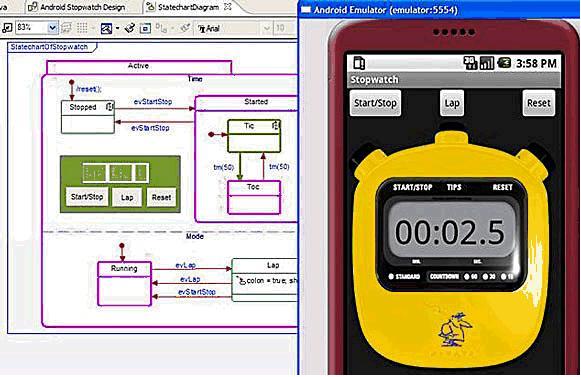
IBM Rational Rhapsody integrates with Rational Team Concert to offer modeling capabilities for Android applications and the visual representation of the Android framework API that developers can reference from within Rational Rhapsody. The references are then generated into Java code to automate the manual coding task. Additionally, Rational Rhapsody can read the AndroidManifest.xml file to visualize activities, services, broadcast receivers, main activity and content provides specified for better understanding of the application. The Rational Rhapsody Debugger also enables runtime animation of the class diagrams created for an Android application.
This article, with the help of a demo video embedded below, shows how RTC and Rhapsody can be together used to design, model, develop and test a mobile application.
 

Download and installation

1) OS: Windows x86 / Linux x86 .

2) IBM Rational Team Concert: Download/buy from the jazz.net download page. RTC can also be installed directly on Eclipse 3.6.x (see http://jazz.net/library/techtip/384). Note that if you're using an existing Eclipse installation to install RTC, make sure you have Eclipse 3.6 or lower (Eclipse 3.7 is not yet supported for Android development).

3)
Android SDK: Download the SDK from Android developer website.

4)
Android Development Tools(ADT): This is an eclipse plugin- the equivalent of JDT(Java Development Tools)- for Android Development. ADT can be downloaded and installed using instructions given at http://developer.android.com/sdk/eclipse-adt.html. Please follow the detailed instructions on this page for installing the ADT plugin, and also for setting the location of Android SDK in Eclipse.

5) It is a good idea to read through the following step by step guide to set up RTC and prepare it for Android Development: http://jazzpractices.wordpress.com/2010/08/10/how-to-set-up-rtc-for-android-development/.


6) IBM Rational Rhapsody: Download and install IBM Rational Rhapsody Developer 7.5.3 from the Rhapsody Downloads page.

7) Including Rhapsody in the RTC Eclipse workbench: In the IBM Rational Team Concert Eclipse Client, go to Help>Install New Software> Add Software Site, and then add the <Rhapsody Installation path>\Eclipse as a local repository.
8) Once the installation is complete, you should be able to use Rhapsody's capabilities inside the RTC Eclipse client.
*Note: You can similarly develop Windows mobile applications using RTC's Visual Studio client and Rhapsody's Visual Studio integration


Creating a new Rhapsody Android project and linking it with an Android project

This step is necessary to create the model elements for an Android project.

  1. Using the Java perspective, create a new Android project. In the demo below, the project is called Test1Project.
  2. Switch to the Rhapsody Modeling perspective, and create a new Rhapsody Android project (You can also read the Rhapsody Help page to read about how to work with Android projects).  This will become the current active project. In the demo, this is called Test1Model.
  3. Switch back to the Java package explorer view, right click on Test1Project, and choose Export.... In the “Export” dialog, select “Rhapsody Model” and click next. The Export to Rhapsody Model Dialog is now displayed. You can choose what elements you want to export into the model. Once this is done, projects Test1Project and Test1Model are now linked.


The Demo

The demo showcases how a distributed team working on an Android application can leverage the functionality provided by IBM Rational tools, namely IBM RTC and IBM Rational Rhapsody (let's call it the Rational Solution) through the complete lifecycle of the application, right from planning, design to implementation to design and testing, and even defect tracking. 
 
Using the Rational solution, a development team can work in either or both of the following 2 ways:

a. Code centric development: Ability to generate code from UML abstraction and state charts.

b. Model centric development: Ability to reverse engineer code into UML abstractions without changing the code layout and to synchronize the changes as they're done.

See the video below:

To see IBM Rational Team Concert and IBM Rational Rhapsody in action, and to know more about the rich features they have to offer, do attend IBM Rational Innovate India 2011 at The Leela, Bangalore from 9-11 August, 2011. You can catch me at the Rational Team Concert solution center. 

For more information

Android is a trademark of Google Inc. Use of this trademark is subject to Google Permissions.

Sunday, July 10, 2011

JazzHub for University - host Rational Team Concert projects on the cloud

IBM Rational recently launched their cloud based offering - JazzHub - for hosting research projects using IBM Rational Team Concert. JazzHub is a free, public, hosting hub for the open development of academic research and classroom projects. Dan Griffin, on the Rational Executive blog, says
With JazzHub, professors, students, and academic researchers will be able to create new collaborative programming projects online or join a project they were invited to - all through a SaaS model with no server install required.
A lot of blogs and articles out there describe this new offering. However, for an engineering students, the terms are not exactly easy to understand, since most of it is industry jargon. Also, if one doesn't know about Rational Team Concert, the whole idea behind JazzHub is lost. So let me explain how the two connect.

Software developers mostly need an IDE to help in tasks such as writing code, compiling, running and debugging projects. However, often when development is done in a team, it becomes cumbersome to share code, work simultaneously on a single piece of code and merge it with relevant changes later, track the work being done, plan who will do what, and in what time frame, keep a track on the work being done by the team members in real time. Many times, developers use third party tools along with an IDE, which may not integrate too well and may just be a stop gap solution.

IBM Rational Team Concert (RTC) is a software development tool that brings together multiple tools that a software developer, working in a team, typically needs into one single IDE. It is built on the Eclipse platform and has two IDE's - one each for Eclipse and Visual Studio, to cater to a developer's need.  With RTC, it becomes easy to work in a team, even if the members are located in different geographies. It even has its own version control system that helps team members to easily share and work on the project source code. RTC also has provisions for project planning and using software models such as the agile model, waterfall model, iterative model, etc. depending on the needs and what stage a project is on. Such a software will, thus, be immensely helpful for students and professors working on research projects. Professors can easily administer and evaluate the project and students can work on their own areas without spending lots of time on trivial tasks such as merging code changes. See the Ted developer videos here for more:


Since RTC helps one share source code and project work items, etc., it needs to have a server installed. The RTC folks understand that the setup for the server is not very trivial and hence, JazzHub, a cloud based offering, makes it easy for students to just get started (for free!) without the hassles of a server.

We are travelling far and wide to educate students about the immense benefits of this new offering. If you are interested to have us organize a workshop about RTC and JazzHub at your college, feel free to contact me ( or drop a comment here) and we'll work out a plan!

To know more about JazzHub, be there at Innovate 2011, Bangalore. If you're a student, you can also win free passes to Innovate by blogging or tweeting about rational products (use hashtag #innovateindia).